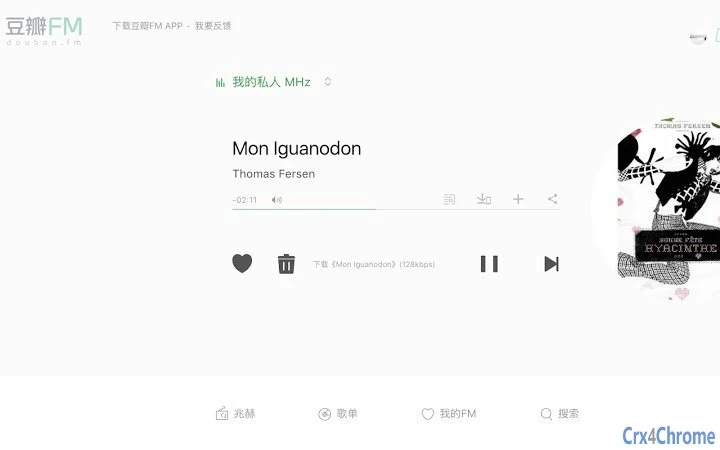

Download High-Quality Music from Douban FM Pro
Overview
The Douban FM Pro Chrome extension enables users to download music directly from the Douban FM Pro service, allowing for offline playback of high-quality tracks. Designed specifically for fans of curated music playlists, the tool enhances the listening experience by providing local storage access to songs streamed through the platform. It is particularly useful for users who want to save favorite tracks without relying on third-party services.
The extension supports a range of users, including music enthusiasts, podcast listeners, and individuals seeking a more personalized audio experience. It integrates with the Douban FM Pro service, which offers a refined music discovery engine based on user preferences and listening habits. While the developer did not provide additional background details, the extension is maintained through a public GitHub repository, indicating a transparent development process.
Real-world use cases include saving music during commutes, building personal music libraries, or sharing tracks with others via local file transfers. The extension does not alter the core functionality of Douban FM Pro but adds a layer of convenience by streamlining the download workflow. It is designed to work within the Chrome browser environment and is compatible with Windows, Mac, and Linux operating systems.
Key Features & Capabilities
- Direct Song Download – Enables users to save currently playing tracks from Douban FM Pro to their local device in high-quality formats.
- Compatibility with Pro Accounts – Only active Douban FM Pro users can access the download functionality, ensuring adherence to licensing terms.
- Automatic File Naming – Uses metadata from the track to generate accurate and readable filenames, improving organization.
- Support for New Interface Updates – Regular updates ensure compatibility with changes to the Douban FM Pro website layout and domain structure.
- Chrome Downloads API Integration – Leverages native browser functionality to initiate downloads securely and efficiently.
- QR Code Generation for URLs – Includes a secondary utility to generate QR codes from any webpage URL, useful for sharing links via mobile devices.
These features are particularly beneficial for users who frequently listen to music in environments without reliable internet access. The ability to download tracks ensures uninterrupted playback and supports personal music collection building. The inclusion of a QR code generator adds versatility, making the extension useful beyond music downloading. Each update focuses on fixing compatibility issues and improving stability, reflecting a commitment to user experience.
User Interface, Workflow & Performance
The extension presents a minimalistic interface within the Chrome browser, typically appearing as a small icon in the toolbar. Clicking the icon reveals a simple menu with options to initiate downloads or generate QR codes. The workflow is straightforward: once a song is playing on Douban FM Pro, the user clicks the extension icon and selects the download option. The browser handles the rest using its built-in download manager.
Navigation is intuitive, requiring no additional setup or configuration. The extension does not require a separate window or complex interface, reducing cognitive load. Users can monitor download progress through the standard Chrome download panel. The developer did not specify resource usage details, but based on general behavior of lightweight Chrome extensions, it is expected to consume minimal CPU and RAM.
Performance is tied to the stability of the Douban FM Pro service and the browser environment. The extension has been updated multiple times to address compatibility issues, suggesting a responsive approach to changes in the source platform. No reported crashes or instability were mentioned, but exact performance data was not provided. Overall, the workflow is efficient and well-suited for quick, on-demand downloads.
Compatibility & System Requirements
The extension is compatible with Windows, Mac, and Linux operating systems, ensuring broad accessibility across desktop environments. It requires Google Chrome as the host browser, with a minimum version of 31 to utilize the chrome.downloads API. The installation size is 1.4 MB, which is typical for lightweight browser extensions.
Exact system requirements were not listed, but the extension is designed to function within standard Chrome environments. It does not require elevated privileges or additional software dependencies. The developer did not specify any hardware requirements, so it is expected to run on most modern desktop systems with a stable internet connection.
Platform compatibility information is limited to the operating systems and browser version. No additional details about GPU, RAM, or processor specifications were provided. Users should ensure their Chrome browser is up to date to avoid potential issues with functionality.
Pros and Cons
Pros
- Effortless download of high-quality music from Douban FM Pro
- Regular updates to maintain compatibility with platform changes
- Minimal resource usage and lightweight design
- Includes a secondary utility for generating QR codes from URLs
- Open-source code available on GitHub for transparency
Cons
- Only works with Douban FM Pro accounts, not free users
- Dependent on Chrome browser and its API availability
- Does not support batch downloads or playlist export
- Limited to single-track downloads per interaction
- Requires manual initiation for each song
FAQ Section
Is this extension free to use?
Yes, the Douban FM Pro Chrome extension is available at no cost. It is distributed freely and does not require a paid subscription to install or use.
Does it work with non-Pro accounts?
No, the extension only enables downloads for users with an active Douban FM Pro account. Free-tier users will not have access to the download feature.
Can I use it on Mac, Windows, and Linux?
Yes, the extension is compatible with Windows, Mac, and Linux operating systems, as long as they support Google Chrome.
Is the extension safe to install?
Yes, the extension is open-source and hosted on GitHub. Users can review the code for transparency. It operates within Chrome’s secure extension environment and does not request excessive permissions.
How often are updates released?
Updates are released as needed to maintain compatibility with changes to Douban FM Pro, such as domain shifts or UI updates. The latest version is 1.0.13, released on March 15, 2024.
Final Thoughts + CTA
This Chrome extension delivers a focused, reliable solution for Douban FM Pro users who want to download and keep their favorite music locally. Its clean design, regular updates, and transparent development make it a trustworthy tool for music enthusiasts. While it lacks advanced features like batch downloads or playlist export, its core functionality is solid and well-executed.
It is especially beneficial for users who value offline listening, personal music libraries, or seamless sharing via QR codes. The combination of music download and URL sharing utilities adds unexpected value. For those already using Douban FM Pro, this extension enhances the experience without unnecessary complexity.
Download Douban FM Pro Music Now







